![trs-logo-black.webp]](https://help.thereadystate.com/hs-fs/hubfs/trs-logo-black.webp?height=50&name=trs-logo-black.webp)
TheReadyState.com / Mobility Coach web app
If you’re trying to access your Ready State account, Mobility Coach on the web, or your protocols:
- Go to TheReadyState.com.
- Select the account icon in the upper-right corner.
- On the login window, select Lost your password?
- Enter the email address associated with your Ready State account.
- Follow the password-reset instructions sent to your email.
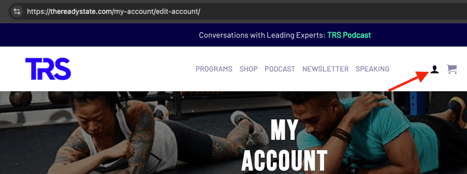
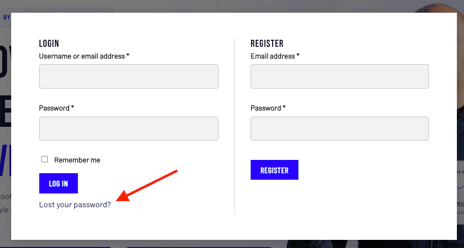
Once logged in, you can reset your password through your my-account page
https://thereadystate.com/my-account/
Or by going directly here: https://thereadystate.com/my-account/edit-account/
The Ready State Mobility Coach mobile app /
If you’re using the Ready State mobile app:
- Open the app.
- From the sign-in screen, select Reset Password.
- Enter the email address associated with your Mobility Coach account.
- Follow the instructions sent to your email to create a new password.
- Return to the app and sign in using your passcode.
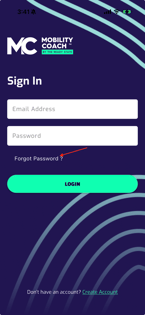
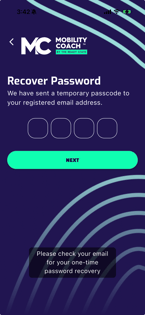
Starrett System app
If you’re trying to access your Starrett System programming or habit tracking:
- Open the Starrett System app.
- From the login screen, select Forgot your password?
- Enter the email address associated with your Starrett System account.
- Follow the password-reset instructions sent to your email.
- Return to the app and sign in with your new password.
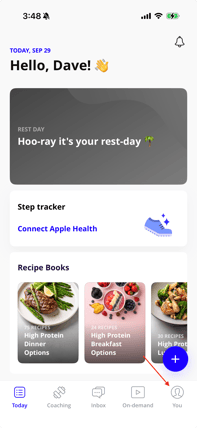
- To reset/change your password, tap the "you" icon in the footer
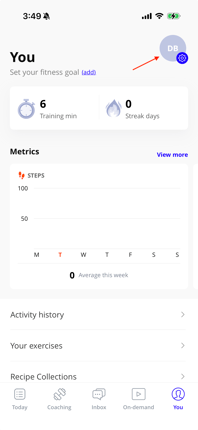
- Tap the "Settings" icon in the header and select "Change Password"
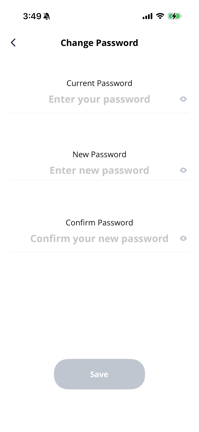
- Enter old password. Enter and confirm new password
Circle / Ready State professional courses and community
Circle works a little differently.
Instead of using a traditional password, Circle can send a sign-in code directly to the email address associated with your account.
- Open the Ready State community in Circle.
- Enter your email address.
- Select Continue.
- Check your email for the sign-in code.
- Enter the code to access your account.
If you don’t receive the code, confirm that you entered the correct email address and select Resend code.
I’m not receiving the reset email or sign-in code
Before requesting another reset:
- Confirm that you entered the email address associated with your Ready State purchase or account.
- Check your spam, junk, promotions, or other filtered folders.
- Allow a few minutes for the message to arrive.
- Avoid repeatedly requesting resets in rapid succession.
If you’re still unable to access your account after completing the appropriate reset process, tap or click "No" below and you'll be escalated to a support agent