![trs-logo-black.webp]](https://help.thereadystate.com/hs-fs/hubfs/trs-logo-black.webp?height=50&name=trs-logo-black.webp)
If you already have an active Ready State membership, do not purchase another subscription.
This usually happens because the app or website is not recognizing the account or purchase currently associated with your membership.
Start with the steps below.
1. Make sure you’re signed into the correct Ready State account
Confirm that you’re logged in using the same email address associated with your membership, Course or Protocol purchase.
If you’re logged into the wrong account, sign out and sign back in with the correct email address.
2. Where did you originally purchase your membership?
Your next step depends on where the subscription was purchased.
If you subscribed on TheReadyState.com
Make sure you’re logged into TheReadyState.com with the email address connected to your active membership.
If your membership is active but you’re still being prompted to subscribe, the account may need to be reviewed.
If you subscribed through the Apple App Store
Make sure you’re signed into the Ready State app with the correct Ready State account.
Then restore your purchase.
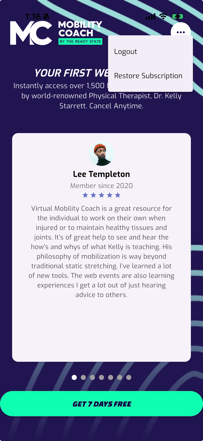
Restoring a purchase does not create a new subscription or charge you again. It simply asks the app to recognize an existing App Store purchase.
If you subscribed through Google Play
Make sure you’re signed into the Ready State app with the correct Ready State account.
Then restore or refresh your existing Google Play purchase.
Do not start a new subscription while troubleshooting your existing one.
3. Still being asked to subscribe?
If you have confirmed that:
- your membership is active
- you’re signed into the correct Ready State account
- and you’ve restored your purchase where applicable
but you’re still being asked to subscribe, the issue likely requires an account review. Click "No" below and you'll be escalated to a support agent.